Pages

Tuesday, 27 January 2015

Micro-Box Imei V1.0.0.7 - NEW MODELS ADDED + LG BACK by IMEI 27 January 2015

27 January 2015 - Micro-Box Imei V1.0.0.7 - NEW MODELS ADDED + LG BACK by IMEI


27 January 2015 - Micro-Box Imei V1.0.0.7 - NEW MODELS ADDED using special credits:


- ZTE F120,
- ORANGE TARA 3G


Price for 1 IMEI is 1 SPECIAL CREDIT
Delivery time: INSTANT!


NEW MODELS ADDED for FREE:


HUAWEI :
- R201,
- R205,
- R206,
- R207,
- R208,
- R210,


+

Repaired GO177 unlock Code

+

LG IS BACK ! By IMEI 2 to 15 minutes delivery ! Price is now 3 Special Credits !


Take the update from Our SUPPORT page or from:

ALTERNATIVE DOWNLOAD LINK(s):

http://rombase.net/support_microbox/....0.7_FINAL.rar

Free Download Now Samsung G530h crt file 4shard.com

All my friend just use Ufs3 octupas support area same cert file added.

Originally Posted by Q/U/S View Post

just upload 100% working file don't post faki cert file

Monday, 26 January 2015

How To S5 duos G900FD & G900MD imei repair

this solution for Turkish users

attention
sim1 will not work only sim2 work

Spt version must be 18.4.4 Updated to 18.4.4B
V18.4.4B available on support
-root phone
-select model G900MD
-reset default EFS
-select model G900FD
-select super imei for SIM1
-input any imei for SIM2
-Do factory Mode with uart cable
-open dial and type *#0808#
-select DM+MODEM+ADB
-do repair 3g network
-restart after done
-put sim in slot 2
-power phone and wait 2-3 minutes

congratulation

by the way
G900FD & G900MD same

don't forget thanx btn


sent from my GT-i9500 》{Cinan ali}《

G7102 IMEI repair final solution7102 4.4.2 chose the correct file

-select Model g7102
-reset EFS Default
-Root With Cf-auto-root
-flash the attachment file [Modem] by ODIN select PHONE section
-go back to SPT check repair imei and unlock ,do factory mode
-now select g7106 model and do [repair 3g network]

attention
attachment file is 2 modems file
g7102 4.3
g7102 4.4.2
chose the correct file
https://www.dropbox.com/s/5xgkxh0kht...odems.rar?dl=0

+if wifi not work
-download root explorer
-grant supersu
-mount as R/W
-delete EFS folder [don't worry]
-restart your phone


congratulation

don't forget thnx

cinan ali

Voice Xtreme v14 Mt6572 Read flash save As Scatter file done By Miracle box 2015

Voice Xtreme v14 Mt6572 Read flash save As Scatter file done By Miracle box


Read flash save as Scatter file


B.R

Mr.bhatti

HUAWEI Ultym5 g535 4.3 unlock Android Version: 4.3 "Jelly Bean SigmaKey 2.08.01 ADB: Direct unlock

android adb platform

SigmaKey v.2.08.01
10xxxxxx Sigma dongle 2.08, Initializing...OK
Pack 1: Activated
--------- 2015-01-24 09:25:47 ---------
SigmaKey 2.08.01 ADB: Obtain root privileges (Method #1)
* daemon not running. starting it now *
* daemon started successfully *
^ ROMaster Composite ADB Interface
Version: Linux version 3.4.0-gefe19a2 (j71036@mha-Tecal-XH620) (gcc version 4.7 (GCC) ) #1 SMP PREEMPT Wed Apr 23 04:36:54 IST 2014
Phone model: HUAWEI Ultym5
Firmware: Ultym5
Date: Wed Apr 23 04:23:42 IST 2014
Version: G535-L11V100R001C530B117
Baseband Firmware: 100131
Android Version: 4.3 "Jelly Bean"
Obtaining root privileges...Skipped

what problem i cant root it
 SigmaKey v.2.08.01
10xxxxxxxx Sigma dongle 2.08, Initializing...OK
Pack 1: Activated
--------- 2015-01-26 09:53:10 ---------
SigmaKey 2.08.01 ADB: Direct unlock
* daemon not running. starting it now *
* daemon started successfully *
^ Android Adapter ADB Interface
Version: Linux version 3.4.0-gefe19a2 (j71036@mha-Tecal-XH620) (gcc version 4.7 (GCC) ) #1 SMP PREEMPT Wed Apr 23 04:36:54 IST 2014
Phone model: HUAWEI Ultym5
Firmware: Ultym5
Date: Wed Apr 23 04:23:42 IST 2014
Version: G535-L11V100R001C530B117
Baseband Firmware: 100131
Preparing...Please ROOT the phone first!

i cant root it i cant unlock

where problem

thanks

BST-Redmi NOTE1W-MTK6592 Remove ScreenLock (w/o USB Debug, w/o Root, w/o userdata loss)

BST-Redmi NOTE1W-MTK6592 Remove ScreenLock (w/o USB Debug, w/o Root, w/o userdata loss)


http://www.youtube.com/watch?v=R0liq2aYT6Y


Tips: MTK6592 remove screenlock operation without usb debugging, w/o root, w/o userdata loss problem!

How to remove screenlock(Pattern, PIN, Password, Face lock):
1. Choose "Screen Lock" and then check "Android Usb Debug" option
2. Click "Start"
3. Disconnect usb cables and then power on the phone after software request power on the phone
4. Connect usb cables after phone power on
5. Unlock done

GsmBest Team
 salam can you help me
Turn OFF device and connect ...
Sending Loader ...
Device Information
Chip Model : MT6577
Chip Name : MT6577_S00
Hardware code : 6577
Secure Ver : ff
Chip BL Ver : 01
EMMC ID : 204a0190-594e4958-fca11648-fb409167
EMMC UA size : e7000000
Boot1 Size : 00200000
Boot2 Size : 00200000
RPMB Size : 00200000
Internal Ram : 00020000
Ext. Ram Type : HW_RAM_DRAM
Ext. Ram Size : 40000000
Turn OFF device and connect ...
Sending Loader ...
Looking for data ...
Reading data ... done
Saving backup file to "D:\BST\backup\MTK\MT6577\MT6577_BOOT_2015-01-26_09.15.48.bin"
Writing data ... done
Turn on device and install driver ...
Restarting ADB service ... ok
timeout
Turn OFF device and connect ...
Sending Loader ...
Looking for data ...
Reading data ... done
Saving backup file to "D:\BST\backup\MTK\MT6577\MT6577_BOOT_2015-01-26_09.19.54.bin"
Writing data ... done

 Hi, MC2

"Turn on device and install driver ... timeout" check logs please

How to remove screenlock(Pattern, PIN, Password, Face lock):
1. Choose "Screen Lock" and then check "Android Usb Debug" option
2. Click "Start"
3. Disconnect usb cables and then power on the phone after software request power on the phone
4. Connect usb cables after phone power on
5. Unlock done

Best Regards
GsmBest Team

How To Unlock iPhone 4 IOS 7.1.2 With BB 04.12.09 Complete Review Here 2015

How To Unlock iPhone 4 IOS 7.1.2 With BB 04.12.09 Complete Review Here

First Of All Hi to all On this Forum I have an Shop and sale Phones specialy iPhones and Its Repiaring now i Wanna share some news About iPhone 4 IOS7.1.2 with Baseband 04.12.09 Just Now I Am checking and Then Write A review Here with Some Proofs , Its Done Successfully And I am Using All Apps With Full Signals i Try With I have 2 iPhone 4 And Result Is Ok.

Official download link Infinity Chinese Miracle-2 SPD/Spreadtrum 1.01 - SPD65xx Full Repair+Samsung Forensic

Chinese Miracle-2 SPD/Spreadtrum v1.01 released - SPD65xx Full Repair + Samsung Forensic

SPD6500/SPD6530/SPD6531:
- Full Repair improved (NV/FFS Rebuild)
All damage cases now supported (dead by other tools, FFS faults, NV faults)
- User Code read improved
- Repair Security in flash mode improved
- NV operations improved

SPD6610/SPD6620 support improved:
- User Code Read improved
- Repair Security in flash mode improved

SP6530/SPD6500 Samsung:
E1205Y added in list of supported
- User Code Read improved
- Forensic Mode activated for Samsung!
Supported Models:
E1200i, E1202i, E1200r, E1200q, E1205y, E1270, E1272, E1280, E1282t, E2200, E2202v, B310e
Supported Features:
- PhoneBook reading
Allow read PhoneBook from phone on any state - Dead/Damaged FileSystem etc.
Unicode support (Correct data on all languages)

Other
Flash ID database updated
Some bugfixes at all


Discussion thread

http://forum.gsmhosting.com/vbb/f475/infinity-chinese-miracle-2-spd-spreadtrum-1-01-spd65xx-full-repair-samsung-forensic-1907663/

Previous version: Chinese Miracle-2 (Release) SPD/Spreadtrum v1.00 released - 6610/6620/6500/6530

PEL P1 Touch Flash File spd 6531Tested 2015 New

PEL P1 Touch Flash File spd 6531Tested 100%


P1 SF_N25W128 

FULL FREE
http://www.4shared.com/rar/HuVDn2Xtba/P1_Touch_spd6531.html

call me 01725734946 # nazmul_2014@yahoo.com  # call me 01725734946 # nazmul_2014@yahoo.com 
------------------------------------------------------------------------------------------------------------

Maximus M313s Flash File mtk 6260 Tested 2015

Maximus M313s Flash File mtk 6260 Tested


Hardware version:CA00
  Software version:0000
  CPU TYPE:6260
  Internal version:8000
  Flash ID: 00C8006000170000
              Flash Type: SF_GD25LQ64                
  Chip Capacity: 0x800000(8MB)
  privacy:0000
http://www.indishare.com/kb5ps59ff4ke
 
call me 01725734946 # nazmul_2014@yahoo.com  # call me 01725734946 # nazmul_2014@yahoo.com

Kingstar KS X700 Flash File Cpu 6531

Kingstar KS X700 Flash File spd 6531DA
6531_SF_GD25LQ32
http://www.indishare.com/zjoz2r6ugeu9

call me 01725734946 # nazmul_2014@yahoo.com  # call me 01725734946 # nazmul_2014@yahoo.com

Sunday, 25 January 2015

How To Know Lattest Firmware and Versin In Z3x Shell

How To Know Which Is Lattest Firmware and What is Firmware Version In Z3x Shell Support Plz Help me.......
I Want To Download I9300 Lattest Firmware Version From Z3x Shell Support.....

You can follow this thread to understand Samsung firmware version

samsung Galaxy note 4 n910w8 Android version: 4.4.4 imei repair via cert Samsung Tool v.18.7.4

Forum,

Attached is log of n910w8 fix ia cert


Selected model: SM-N910W8

Selected port: COM678 SAMSUNG Mobile USB Serial Port

Selected port speed: 115200

Checking certificate file... OK

Searching ADB device... OK

Reading phone info...

Model: SM-N910W8

Android version: 4.4.4

Product code: Not Active

Phone version: N910W8VLU1ANJ3

PDA version: N910W8VLU1ANJ3

CSC version: N910W8OYA1ANJ3

IMEI: Unknown

Phone S/N: RF8FB1WD50T

Checking Super user right... true

Bypass MSL... OK

Checking for compatible phone and cert... OK

Writing CERT... OK

Checking CERT status... OK

Rebooting phone... OK

Done with Samsung Tool v.18.7.4

*

Selected model: SM-N910W8

Selected port: COM678 SAMSUNG Mobile USB Serial Port

Selected port speed: 115200

Reading QCN file... OK

Checking phone at COM678

Detected ID: 00000FF7 (MDM9x25)

SW Version: MPSS.DI.3.0.c5-00258-M9625TAARANAZM-1

Checking paths... OK

Restoring EFS Backup... OK

Restoring NV Items... OK

Restoring NV Item SIM1... OK

Restoring NV Item SIM2... OK

Restoring Provisioning Item Files... OK

Done with Samsung Tool v.18.7.4

Saturday, 24 January 2015

Samsung Original GT-E1205Q - Format Successfull "Non Risk" Just Click & Enjoy


Samsung Original GT-E1205Q
- Format Successfull "Non Risk" Just Click & Enjoy...

Nokia 220 security code reset Done 100% Safe Only With GPGDragon

Nokia 220 Format Done 100% Safe Only With GPGDragon
Nokia 220 security code reset Done 100% Safe Only With GPGDragon

Download Samsung SM-N900 CERT File from

CERT File from SM-N900


Quote:
INFO : 08-10-2014 14:50:49 > Platform: Samsung Android
INFO : 08-10-2014 14:50:49 > Selected port: COM1
INFO : 08-10-2014 14:50:49 > Selected model: SM-N900
WARN : 08-10-2014 14:50:51 > Please, press "OK" button on the phone to allow USB debugging..
INFO : 08-10-2014 14:50:53 > Detected phone model: SM-N900
INFO : 08-10-2014 14:50:53 > Firmware compiled date: Fri Aug 8 02:20:45 KST 2014
INFO : 08-10-2014 14:50:54 > PDA version: N900UBUENH1
INFO : 08-10-2014 14:50:54 > CSC version: N900UUBENG1
INFO : 08-10-2014 14:50:55 > SW version: N900UBUENG1
INFO : 08-10-2014 14:50:56 > Phone IMEI: 358021058471446
INFO : 08-10-2014 14:50:56 > Phone SN: RF1D93A24AK
INFO : 08-10-2014 14:50:56 > Android version: 4.4.2 (KOT49H)
INFO : 08-10-2014 14:50:56 > Checking Root:
INFO : 08-10-2014 14:51:00 > Phone is Rooted.
INFO : 08-10-2014 14:51:09 > Reading Certificate...
INFO : 08-10-2014 14:51:09 > Executing exploit...
INFO : 08-10-2014 14:51:32 > Exploit has been executed successfully
WARN : 08-10-2014 14:51:41 > Phone will restart now
INFO : 08-10-2014 14:51:41 > Certificate read successfully
Download

Download All Samsung CERT File done with OCTOPUS BOX

Now that you may READ/WRITE CERT by Octopus Box this Thread should be very useful for sharing CERT files and solve many issue with 3G/4G network.

Small rules:

- please not share CERT from Not Full working device
- please write from wich country is CERT files
- please Upload in .rar format with model of phone
- please not only take and not share anything
- please thanks only through thanks button
- please use common sense!!


CERT files from G900h, (International Exinos cpu) here:
https://www.sendspace.com/file/ctihme

Qmobile a110 6572 dead recover done full flash file +instructions)

hi,here u can find how recover ur noir a110 without any box.

requirments!

1) faulty phone (a110)
2) tested flash file donload from here file password is madnishah
3) tested recovery file download here
4)SP_Flash_Tool_v5.1352.01 (download from google)

instructions
first download tested flash file and recovery file. thanks to irfan shahzad for sharing file .now extract a110 firmware.zip and replace recovery with inside recovery file (important step) then open sp flash tool and load scatter file when all files load click on download and connect your mobile with usb cable and w8 for complete.


KARBONN K695+ Call Detail ISSUE SOLVED VIA FORMAT

KARBONN K695+ Call Detail ISSUE SOLVED VIA FORMAT


Code:
 Initializing...
 DA_LIB_VER_6.1.0.5
 Auto reset and search the USB-to-Serial...
 Connecting...
 Spd USB-to-Serial=COM59
 Connected...sending boot...
 FDL test...OK
 ArmBootMode: 6531000000005A00_00
 Wait for init Commzero Security Engine...
 Done.
 Loading bootloader...
 Done.
 Changing baudrate...
 Set baudrate to 115200 is ok
 Reading phone HW info...
 Read info is done.
 CPU: SC6531      Flash: SF_GD27Q32
 setting the Flash Parameters...
 Settings have been completed!
 setting the Serial Flash Parameters...
 Settings have been completed!
 Reading FileSystem info...
 FileSystem Version: 80
 Start=0x003C0000, Size=0x00040000
 Unlocking all blocks before program/erase...
 Unlock Done.
 Auto formatting...
 Done.

Br,
Puneet5154
AvatorBox Helpdesk

Qmobile A9 none usb debugged phone .Pattern unlock done by Avatorbox very easily using factory mode enable

Qmobile A9 none usb debugged phone .Pattern unlock done by Avatorbox very easily using factory mode enable .


Rooting


Removing Pattern


Procedure

1-Remove and insert battery in phone
2- press volume+ and volume - and power button
3- When show logo leave power button but keep press both volume buttons
4- Now you will see phone is in factory mode.
5- Open Avator android tool and root your phone.
6- After root set will restart auto matically
7- Now again remove battery and make phone in factory mode
8- Now read pattern ,if not show pattern ,click on remove pattern.All will be fine .
No data loss ,no imei loss ,every thing fine and tension free.

Code:

Application: 1.0.0.11
Model:  Autodetect
Request information...
Searching Phone...
Device Found
Reading info...
Manufacturer: QMobile
Model: A9
ID: JRO03C
Android ver: 4.1.1
CPU type: armeabi-v7a
Region: US
Locale: en
Chipset: 
HW version: mt6577
CPU: ARMv7
CPU implementer: 0x41
CPU architecture: 7
CPU variant: 0x3
CPU part: 0xc09
Kernel ver: 3.4.0 
Root status: On
Initializing...
Pattern Lock: Enter any pattern to unlock Device
Done


Wbr
..:\\lucky//:..

NOKIA 108 After flashing Contact serves show in Disply

Analysis of USB port,Please insert phone USB cable.
Connecting...
Hardware version:CA01
Software version:0001
CPU TYPE:625A
Internal version:8000
Boot downloading complete!
Flash ID: 00EF004000160000
Flash Type: SF_W25Q32BV
Chip Capacity: 0x400000(4MB)
Start to analyze file, may take several minutes....
Flash writing complete.
Flash file D:\NOKIA All files\108 DS RM-944\VolcanoBox_NOKIA108(RM944)_FlashFile.bin has been written.

so plz some explain
http://forum.gsmhosting.com/vbb/f723/nokia-108-after-flashing-contact-serves-show-disply-1907060/

Successfull repaired IMEI in SONY XPERIA M C1905 How To work

Successfull repaired IMEI in SONY XPERIA M C1905.

This phone had lost Imei for wrong customer operaction, have tried to restore Original Imei with Octopus but nothing, only was reading Original Imei from BKP TA but impossible to restore, then have download Last version 4.3 for this C1905 and flashed with this Tool, Imei Restored in 3 minuts after flash finish, loock:


Code:
22/041/2015 14:41:31 - INFO  - Flashtool Version 0.9.18.2 built on 09-06-2014 22:30:00
22/041/2015 14:41:31 - INFO  - Executing search strategies to find proxy selector
22/041/2015 14:41:31 - INFO  - No proxy found for IE. Trying next one
22/041/2015 14:41:31 - INFO  - No proxy found for firefox. Trying next one
22/041/2015 14:41:31 - INFO  - No proxy found for java. Trying next one
22/041/2015 14:41:31 - INFO  - Syncing devices from github
22/041/2015 14:41:32 - INFO  - Scanning devices folder for changes.
22/041/2015 14:41:44 - INFO  - Pulling changes from github.
22/041/2015 14:41:46 - INFO  - Devices sync finished.
22/041/2015 14:41:51 - INFO  - Device disconnected
22/044/2015 14:44:38 - INFO  - Selected Bundle for Sony Xperia M (C1905). FW release : 15.4.A.1.9. Customization : CE
22/044/2015 14:44:38 - INFO  - Preparing files for flashing
22/046/2015 14:46:15 - INFO  - Please connect your device into flashmode.
22/046/2015 14:46:31 - INFO  - Device connected in flash mode
22/046/2015 14:46:32 - INFO  - Opening device for R/W
22/046/2015 14:46:32 - INFO  - Reading device information
22/046/2015 14:46:32 - INFO  - Phone ready for flashmode operations.
22/046/2015 14:46:32 - INFO  - Current device : C1905 - YT910CC8F2 - 1277-8307_R1A - 1272-2325_15.1.C.2.8 - WORLD-i_15.1.C.2.8
22/046/2015 14:46:32 - INFO  - Start Flashing
22/046/2015 14:46:32 - INFO  - Processing loader.sin
22/046/2015 14:46:32 - INFO  -     Checking header
22/046/2015 14:46:32 - INFO  -     Flashing data
22/046/2015 14:46:32 - INFO  - Processing of loader.sin finished.
22/046/2015 14:46:32 - INFO  - Loader : S1_Root_dbe9 - Version : loader_MSM8X30_10 / Boot version : S1_Boot_MSM_8227_5 / Bootloader status : ROOTED
22/046/2015 14:46:33 - INFO  - Disabling final data verification check
22/046/2015 14:46:33 - INFO  - Processing partition-image.sin
22/046/2015 14:46:33 - INFO  -     Checking header
22/046/2015 14:46:33 - INFO  -     Flashing data
22/046/2015 14:46:33 - INFO  - Processing of partition-image.sin finished.
22/046/2015 14:46:33 - INFO  - Parsing boot delivery
22/046/2015 14:46:33 - INFO  - Phone boot version : S1_Boot_MSM_8227_5. Boot delivery version : S1_Boot_MSM_8227_5
22/046/2015 14:46:33 - INFO  - Boot delivery up to date. Nothing to do
22/046/2015 14:46:33 - INFO  - Processing kernel.sin
22/046/2015 14:46:33 - INFO  -     Checking header
22/046/2015 14:46:33 - INFO  -     Flashing data
22/046/2015 14:46:34 - INFO  - Processing of kernel.sin finished.
22/046/2015 14:46:34 - INFO  - Processing rpm.sin
22/046/2015 14:46:34 - INFO  -     Checking header
22/046/2015 14:46:34 - INFO  -     Flashing data
22/046/2015 14:46:34 - INFO  - Processing of rpm.sin finished.
22/046/2015 14:46:34 - INFO  - Processing fotakernel.sin
22/046/2015 14:46:34 - INFO  -     Checking header
22/046/2015 14:46:34 - INFO  -     Flashing data
22/046/2015 14:46:35 - INFO  - Processing of fotakernel.sin finished.
22/046/2015 14:46:35 - INFO  - Processing modem_fs2.sin
22/046/2015 14:46:35 - INFO  -     Checking header
22/046/2015 14:46:35 - INFO  -     Flashing data
22/046/2015 14:46:35 - INFO  - Processing of modem_fs2.sin finished.
22/046/2015 14:46:35 - INFO  - Processing modem.sin
22/046/2015 14:46:35 - INFO  -     Checking header
22/046/2015 14:46:35 - INFO  -     Flashing data
22/046/2015 14:46:40 - INFO  - Processing of modem.sin finished.
22/046/2015 14:46:40 - INFO  - Processing modem_fs1.sin
22/046/2015 14:46:40 - INFO  -     Checking header
22/046/2015 14:46:40 - INFO  -     Flashing data
22/046/2015 14:46:40 - INFO  - Processing of modem_fs1.sin finished.
22/046/2015 14:46:40 - INFO  - Processing cache.sin
22/046/2015 14:46:40 - INFO  -     Checking header
22/046/2015 14:46:41 - INFO  -     Flashing data
22/046/2015 14:46:41 - INFO  - Processing of cache.sin finished.
22/046/2015 14:46:41 - INFO  - Processing system.sin
22/046/2015 14:46:41 - INFO  -     Checking header
22/046/2015 14:46:41 - INFO  -     Flashing data
22/048/2015 14:48:24 - INFO  - Processing of system.sin finished.
22/048/2015 14:48:24 - INFO  - Processing userdata.sin
22/048/2015 14:48:24 - INFO  -     Checking header
22/048/2015 14:48:24 - INFO  -     Flashing data
22/048/2015 14:48:30 - INFO  - Processing of userdata.sin finished.
22/048/2015 14:48:30 - INFO  - Processing elabel-C1905-row_201310151500.1_15.4.A.1.9.sin
22/048/2015 14:48:30 - INFO  -     Checking header
22/048/2015 14:48:30 - INFO  -     Flashing data
22/048/2015 14:48:32 - INFO  - Processing of elabel-C1905-row_201310151500.1_15.4.A.1.9.sin finished.
22/048/2015 14:48:32 - INFO  - Ending flash session
22/048/2015 14:48:32 - INFO  - Flashing finished.
22/048/2015 14:48:32 - INFO  - Please unplug and start your phone
22/048/2015 14:48:32 - INFO  - For flashtool, Unknown Sources and Debugging must be checked in phone settings
22/048/2015 14:48:33 - INFO  - Device connected in flash mode
22/049/2015 14:49:04 - INFO  - Device disconnected
Warning Last Version for Windows have any Bug, not work in Win 7 32Bit, release error, this version is FULLY WORKING.

New Post For How to Update] Any Xperia Phone Using FTF File & Flash Tool 2015

I will explain How to Update Any Xperia Phone Using FTF File & Flash Tool ?

The first thing that you need to Download last version flashtool from here


Step 1 : Download the Flash tool and install it. Open "C:\Flashtool\drivers"
Run the program “Flashtool-drivers” .Check the option “”Select components to install” and find the phone for which you want to flash the ftf file. Select both ”Flashmode drivers” and “Fastboot drivers”. Click the “install” button and wait till drivers are installed on your PC.

Now open ”C:\Flashtool\firmwares”, copy paste the downloaded ftf file specific to your xperia device & latest firmware.

Run FlashTool

Step 2 : Switch off your xperia,wait for 30 seconds, Insert USB Cable in PC first & hold “Volume Down” button while you insert cable in Xperia phone. Green light in notification LED confirms that phone has been connected successfully.

Step 3 : Notice the “Black Thunder” option in the top most left corner. Click & Choose option “flashmode”.

Click “Select source folder” and select the copied ftf file from “C:\Flashtool\firmwares” and check the option “Wipe Data”. Under option “Misc” , check mark the option “No Final verification” if you are on Android 4.0.4 ICS Stock version.

Click OK, now Flashtool will prepare files for flashing & flash the selected ftf file on your xperia device.

Start the phone once the flashing is done. The first reboot will be very slow. after that.

Z3X Easy-JTAG BOX Update. 1.7. ADDED boot repair VIA JTAG connection

EASY-JTAG 1.7 Released. Lot of phones + ISP eMMC Regions writing

ADDED boot repair VIA JTAG connection:

- support SAMSUNG GT-S6812 (Read/Write/1click repair boot/EFS)
- support SAMSUNG GT-S7250D (Read/Write/1click repair boot)
- support HUAWEI U8686 (Read/Write/1click repair boot)

ADDED vis ISP (Direct EMMC):

- support SAMSUNG GT-S5282 (ISP pinout/Dump) - FIRST IN THE WORLD
- support AMAZON KINDLE FIRE HD 8.9 (PINOUT/DUMP)

SD unbrick card Generator Update:
New SD image uploaded:

- SAMSUNG SM-T531 [T531XXU1AND8] 4.4.2

- SAMSUNG GT-I9507 [I9507ZHUAMJ1] 4.2.2

- SAMSUNG GT-I9507V [I9507VZNUANB3] 4.2.2

- SAMSUNG GT-I9508 [I9508ZMUAMG1] 4.2.2

- SAMSUNG GT-I9508V [ I9508VZMUBND2] 4.3

SD unbrick new files:
Samsung_GT-I9507_16G.pit
Samsung_GT-I9507_I9507ZHUAMJ1_GPT_UEFI_4.2.2.zbin
Samsung_GT-I9507V_16G.pit
Samsung_GT-I9507V_I9507VZNUANB3_GPT_UEFI_4.2.2.zbin
Samsung_GT-I9508_16G.pit
Samsung_GT-I9508_I9508ZMUAMG1_GPT_UEFI_4.2.2.zbin
Samsung_GT-I9508V_16G.pit
Samsung_GT-I9508V_I9508VZMUBND2_GPT_UEFI._4.3zbin
Samsung_SM-T531_16G.pit
Samsung_SM-T531_T531XXU1AND9_GPT_UEFI_4.4.2.zbin


Second part of Update:

We have released new version of EasyJTAG with some new functionality. We call it eMMC Regions writing. Short description are : you can manually select what regions of eMMC image write to target card. Main goals that you always can preserve so called security regions like modemst1 or mk9kefsX regions that store sensitive IMEI data. Or JUST write single AREA from fullflash like EFS in case of some parts damaged by wrong flashing or unlocking. Here short manual in 3 small pictures.


Screenshot's here

PS1. If anyone have working phones not supported by ZBIN solution: exynos, qualcomm, please contact with me, for remote adding.

PS2. NEW phones added request only HERE


Discuss here

Micromax x222 Blinking and restart Done how to work

.
  Micromax x222 Blinking and restart Done by Avatorbox

Micromax x222 Blinking and restart Done by Avatorbox

http://www.youtube.com/watch?v=g0FHq60tIlo

Octopus Box LG Software v.1.8.2 Release Notes dded Repair Network for

Octoplus/Octopus Box LG Software v.1.8.2 Release Notes
  • D618 - added Repair BT Address, Repair Wi-Fi Address, Write firmware (KDZ, DZ, TOT files can be converted), Read/Write/Repair NVM, Read/Repair Security, Write Security Backup, Read/Write QCN, Read Full Flash (Dump NAND)
  • Added Repair Network for:
- D150
- D160, D160F, D160G, D160GO, D160J, D160TR
- D165, D165AR, D165F, D165G
- D170, D175F
- D285, D285F, D285G
- D295, D295F
- D315, D315H, D315I, D315K, D315S
- D325, D325F, D325F8, D325G8
- D380, D385
- D722, D722J, D722K, D722P, D722V
- D851, D851TN, 851WH
- D855, D855AR, D855K, D855P, D855TR
- D956
  • Added Write Firmware (now is possible to convert for flashing KDZ, DZ and TOT files) for:
- D280, D280AR, D280F, D280G, D280NR, D280TR
- D285, D285F, D285G
- D290, D290G, D290J, D290N, D290TR
- D295, D295F
- D315, D315H, D315I, D315K, D315S
- D722, D722J, D722K, D722P, D722V
- D723, D723TR
- D725, D725P, D725PR
- D955
  • Added support for KDZ firmware (now is possible to convert for flashing KDZ and BIN files) for:
- E440, E440F, E440G, E440J
- E445
- E450, E450B, E450F, E450G, E450J
- E451G
- E455, E455F, E455G
- E460, E460F
- E465F, E465G
- E467F
- E470F
  • All supported operations are described in details in the manual ("Cable & Manual" button in Software).

More info and discussion are HERE
______________________________________


Octoplus/Octopus Box Samsung Software v.1.8.2 Release Notes

  • Added support for the following models:
- SC-04F - added Write Firmware, Write Cert, Wipe Security, Read/Write QCN, Read/Write NVM, Read/Write Security, Read/Write EFS, Reboot in Download/Recovery Mode, Read PIT
- SM-G357M - added Write Firmware, Write Cert, Wipe Security, Read/Write QCN, Read/Write/Repair NVM, Read/Write Security, Read/Write EFS, Reboot in Download/Recovery Mode, Read PIT
- SM-G357F - added Write Firmware, Write Cert, Wipe Security, Read/Write QCN, Read/Write/Repair NVM, Read/Write Security, Read/Write EFS, Reboot in Download/Recovery Mode, Read PIT
- SM-G357FZ - added Write Firmware, Write Cert, Wipe Security, Read/Write QCN, Read/Write/Repair NVM, Read/Write Security, Read/Write EFS, Reboot in Download/Recovery Mode, Read PIT
- SM-G530F - added Write Firmware, Write Cert, Wipe Security, Read/Write QCN, Read/Write/Repair NVM, Read/Write Security, Read/Write EFS, Reboot in Download/Recovery Mode, Read PIT
- SM-G530M - added Write Firmware, Write Cert, Wipe Security, Read/Write QCN, Read/Write/Repair NVM, Read/Write Security, Read/Write EFS, Reboot in Download/Recovery Mode, Read PIT
- SM-G530Y - added Write Firmware, Write Cert, Wipe Security, Read/Write QCN, Read/Write/Repair NVM, Read/Write Security, Read/Write EFS, Reboot in Download/Recovery Mode, Read PIT
- SM-G530BT - added Write Firmware, Write Cert (for IMEI A/B), Wipe Security, Read/Write QCN, Read/Write/Repair NVM, Read/Write Security, Read/Write EFS, Reboot in Download/Recovery Mode, Read PIT
- SM-G530FZ - added Write Firmware, Write Cert (for IMEI A/B), Wipe Security, Read/Write QCN, Read/Write/Repair NVM, Read/Write Security, Read/Write EFS, Reboot in Download/Recovery Mode, Read PIT
- SM-G5308W - added Write Firmware, Write Cert, Wipe Security, Read/Write QCN, Read/Write/Repair NVM, Read/Write Security, Read/Write EFS, Reboot in Download/Recovery Mode, Read PIT
- SM-G5309W - added Write Firmware, Write Cert, Wipe Security, Read/Write QCN, Read/Write/Repair NVM, Read/Write Security, Read/Write EFS, Reboot in Download/Recovery Mode, Read PIT
- SM-G530H - added Write Cert (for IMEI A/B), Wipe Security
- SM-N7500Q - improved Unlock and Repair IMEI operation (added support for new Security type)
- GT-C3520I - added Direct Unlock, Read Codes, Repair Imei, Read/Write/Repair NV, Write Firmware
- GT-I8150 - added Read/Write QCN
- GT-I8150B - added Read/Write QCN
- GT-I8150T - added Read/Write QCN
- GT-I8260 - added Write Cert, Wipe Security
- GT-I8260E - added Write Cert, Wipe Security
- GT-I8260L - added Write Cert, Wipe Security
- GT-I8262 - added Write Cert (for IMEI A/B), Wipe Security
- GT-I8262B - added Write Cert (for IMEI A/B), Wipe Security
- GT-I8262D - added Write Cert (for IMEI A/B), Wipe Security
- GT-I8262L - added Write Cert (for IMEI A/B), Wipe Security
- GT-I9300I - added Write Cert (for IMEI A/B), Wipe Security
- GT-I9301I - added Write Cert, Wipe Security
  • Big gift for all our users! We have uploaded into the Support Area a lot of Certificates files, for SM-G900F, GT-I9515, SM-G7105L and others models!
    Use them, so far they are not blacklisted among your network operators and wait for the new files with the next update!
  • All supported operations are described in details in the manual ("Cable & Manual" button in Software)

More info and discussion are HERE
______________________________________


Octoplus/Octopus Suite v.1.3.0 Release Notes:

- Huawei (All Levels + Reset Key) Factory Code (15 credits)
- Huawei Bootloader Unlock Code (15 credits)
- Huawei - Not Found (35 credits)
- Huawei (All Levels + Reset Key) Emergency Services (35 credits)

All Huawei devices are supported: phones, modems, tablets and so on...

In addition, we introduced a major change concerning Octopus Server credits with this release.
To improve flexibility and for your usage convenience we increase credits count by 10 and reduce prices accordingly.
For example, 10 new credits will be equal to 1 old credit. Credits consumption for all supported operations will be adjusted respectively.
All remaining credits on your balances are multiplied by 10 as well.


More info and discussion are HERE
______________________________________
WBR,
Octoplus Box Team

Japanese Note 4 SCL24 (SM-N915j) NV Read and Write Done which has Android 4.4.4 and Knox

1st in World Japanese Note 4 SCL24 (SM-N915j) NV Read and Write Done which has Android 4.4.4 and Knox 2.2 without Root and without Credit by GC Pro Key


Device Picture


photo upload sites


image upload no limit


Info


Quote:

Using Version...1.0.0.0010
Selected Port VCP0 = COM40
Selected Model
Selected Task SAMSUNG READINFO

Searching phone...

Phone Found Please Wait...

Details. SCL24,N915J.12,SCL24KDU1ANJ3,SCL24KDU1ANJ3,SCL24KD U1ANJ
Model := SM-N915J
UNIQID := CR2000A2F648791
Phone IMEI := 99000470781150
Phone MEID := 99000470781150
Good Default MSL Add Found..
SKEY := 0208
QCOM(QUALCOMM) detected..
IMEISIGN_PASS..
Phone is SIM-Unlocked..
not detected lock status.

Reading Information Finish...

Total Time Take...00:00:29


Read NV


pic upload


Write NV


screenshot software


The Idea Makes the World Beautiful Feel The Power Of GC Pro key

Samsung Tool 18.7 Update. First in the world

Samsung Tool 18.7 Update. First in the world

Added:

- support SM-G386W (flashing, Read/Write QNC, Wipe EFS, Write CERT, auto backup to tar) - first in the world
- support GT-S5300B (flashing, Unlock, Imei repair, Network repair, READ/WRITE cert) - first in the world
- support GT-S5310B (flashing, Unlock, Imei repair, Network repair, READ/WRITE cert) - first in the world
- support GT-S5310T (flashing, Unlock, Imei repair, Network repair, READ/WRITE cert) - first in the world
- support GT-I9060I (flashing, Unlock, Imei repair, Network repair, READ/WRITE cert) - first in the world
- support SM-G360H (flashing, Unlock, Imei repair, Network repair, READ/WRITE cert) - first in the world
- support SM-G357FZ (flashing, Read/Write QNC, Wipe EFS, Write CERT, auto backup to tar) - first in the world
- support SM-G710 (flashing, Read/Write QNC, Wipe EFS, Write CERT, auto backup to tar) - first in the world
- support SM-G7102T (flashing, Read/Write QNC, Wipe EFS, Write CERT, auto backup to tar) - first in the world
- support SM-G7105 (flashing, Read/Write QNC, Wipe EFS, Write CERT, auto backup to tar) - first in the world
- support SM-G7105H (flashing, Read/Write QNC, Wipe EFS, Write CERT, auto backup to tar) - first in the world
- support SM-G7105L (flashing, Read/Write QNC, Wipe EFS, Write CERT, auto -backup to tar)
- support SM-G7106 (flashing, Read/Write QNC, Wipe EFS, Write CERT, auto backup to tar)
- support SM-G7108 (flashing, Read/Write QNC, Wipe EFS, Write CERT, auto backup to tar)

Lot of changes with Marvel PXA phones:
i8200, i8200n and others.

Improved unlock/repair qualcomm based phones with android 4.4.4. (i337,m919 and others)


G360H rooted firmware: link
i9060i rooted firmware: link


PS. Stupid posts like: How about cert reading, how about phones which already supported, how about cert, etc will be deleted.

9500 imei null any solution z3x done but same null Done with Samsung Tool v.16.8

Selected model: I9500
Selected port: COM5 Z3X BOX Serial Port
Selected port speed: 115200
File analysis... OK
Total file size: 0x96B33E40
Searching USB Flash Interface... detected COM88
Setup connection... OK
Reading PIT from phone... OK
Saved to E:\Z3X SETUP FILES\Z3x installation\SamsungTool\Pit\I9500_22-1-2014_23-22-3.pit
Sending sboot.bin... OK
Sending param.bin... OK
Sending boot.img... OK
Sending recovery.img... OK
Sending persdata.img... OK
Sending system.img... OK
Sending modem.bin... OK
Sending cache.img... OK
Sending hidden.img... OK
Flashing done (time - 00:04:07)
Done with Samsung Tool v.16.8

Selected model: I9500
Selected port: COM5 Z3X BOX Serial Port
Selected port speed: 115200
Searching ADB device...
Phone not found
Done with Samsung Tool v.16.8

Selected model: I9500
Selected port: COM5 Z3X BOX Serial Port
Selected port speed: 115200
Searching Samsung modem... not found
Done with Samsung Tool v.16.8

Selected model: I9500
Selected port: COM5 Z3X BOX Serial Port
Selected port speed: 115200
Searching ADB device... OK
Reading phone info...
Model: GT-I9500
Android version: 4.2.2
Product code: Unknown
Phone version: Unknown
PDA version: I9500XXUBMG9
CSC version: I9500OJKBMG9
IMEI: null
Phone S/N: Unknown
Checking Super user right... true
Reading nv data... OK
Reading modem... OK
Checking magic... OK
Running zTool, please wait... OK
Detected new type of security
Calculating... OK
Patching modem... OK
Writing data to phone... OK
Rebooting phone... OK
Repair done
Done with Samsung Tool v.16.8

Selected model: I9500
Selected port: COM5 Z3X BOX Serial Port
Selected port speed: 115200
Searching Samsung modem... not found
Done with Samsung Tool v.16.8

Selected model: I9500
Selected port: COM5 Z3X BOX Serial Port
Selected port speed: 115200
Searching Samsung modem... not found
Done with Samsung Tool v.16.8

Selected model: I9500
Selected port: COM5 Z3X BOX Serial Port
Selected port speed: 115200
Searching Samsung modem... not found
Done with Samsung Tool v.16.8

Selected model: I9500
Selected port: COM5 Z3X BOX Serial Port
Selected port speed: 115200
Searching ADB device...
Please, allow USB debugging on phone... OK
Reading phone info...
Model: GT-I9500
Android version: 4.2.2
Product code: Unknown
Phone version: Unknown
PDA version: I9500XXUBMG9
CSC version: I9500OJKBMG9
IMEI: null
Phone S/N: Unknown
Checking Super user right... true
Reading nv data... OK
Reading modem... OK
Checking magic... OK
Running zTool, please wait... OK
Patching modem... OK
Writing data to phone... OK
Rebooting phone... OK
Repair done
Done with Samsung Tool v.16.8

How to Unlock Your BlackBerry Bold 9790 Fast and Safe

The BlackBerry Bold 9790 was released in 2011 and it had it all: a powerful CPU, good camera and the QWERTY keyboard everybody loved! If you have one, you must really be a messaging fanatic!


So, what do you do if your brand new smartphone is network locked?

In this case, you’re only going to be able to use it with the provider you got it from. Not acceptable, right?

Don’t worry, here’s a quick and easy solution to fix this problem, that doesn’t even require you to leave the house. In fact, you’re not going to have to move from the spot you’re sitting in right now.


How do you unlock your BlackBerry Bold 9790 quick and easy?

Step 1: You need to find out your IMEI number by calling *#06# or going to Settings > More > About device > Status.

Step 2: Write down your IMEI number.

Step 3: Go to UnlockUnit.com, a trusted unlocking website, with lots of satisfied clients, and follow the easy peasy 3 step process to get the unlock code for your BlackBerry Bold 9790.

All you have to do is fill in the order form with the following information:

-your phone model: BlackBerry Bold 9790
-the country and network you originally bought your phone from
-the IMEI of your phone


Then, choose the payment method that best suits you: credit card, PayPal or Skrill. The prices start as low as $5.99, and can vary depending on the country and network your phone is originally locked to.

So you’re not only getting the code quickly, but you also benefit from the best price too!

Step 4: You’ll get your unique unlock code via email, along with further instructions on how to use it. And, voila! Your BlackBerry Bold 9790 is now unlocked and you have the freedom to use any GSM network worldwide.


Now you can enjoy your Bold 9790 and start customizing it. If you ask us, you're looking at one of the best phones ever made by BlackBerry!

If you should find that you need further assistance, take advantage of UnlockUnit.com’s 24/7 lovely customer support. Or leave a comment below and I’ll answer your questions in the shortest time possible.


You can also find UnlockUnit in Play Store.


All the best,

Andrei
UnlockUnit Team

Like us on Facebook | Follow us on Google+

How to Unlock Your LG Optimus 2X Fast and Safe

he LG Optimus 2X, released in 2011, was one of the first smartphones to receive the Android 4.0 update, a spectacular mobile operating system for that time.


So, what do you do if your brand new smartphone is network locked?

In this case, you’re only going to be able to use it with the provider you got it from. Not acceptable, right?

Don’t worry, here’s a quick and easy solution to fix this problem, that doesn’t even require you to leave the house. In fact, you’re not going to have to move from the spot you’re sitting in right now.


How do you unlock your LG Optimus 2X quick and easy?

Step 1: You need to find out your IMEI number by calling *#06# or going to Settings > More > About device > Status.

Step 2: Write down your IMEI number.

Step 3: Go to UnlockUnit.com, a trusted unlocking website, with lots of satisfied clients, and follow the easy peasy 3 step process to get the unlock code for your LG Optimus 2X.

All you have to do is fill in the order form with the following information:

-your phone model: LG Optimus 2X
-the country and network you originally bought your phone from
-the IMEI of your phone


Then, choose the payment method that best suits you: credit card, PayPal or Skrill. The prices start as low as $5.99, and can vary depending on the country and network your phone is originally locked to.

So you’re not only getting the code quickly, but you also benefit from the best price too!

Step 4: You’ll get your unique unlock code via email, along with further instructions on how to use it. And, voila! Your LG Optimus 2X is now unlocked and you have the freedom to use any gsm network worldwide.


Now you can fully enjoy your LG Optimus 2X and start customizing it a bit! Also, try and see what that 8 MP camera can do!

If you should find that you need further assistance, take advantage of UnlockUnit.com’s 24/7 lovely customer support. Or leave a comment below and I’ll answer your questions in the shortest time possible.


You can also find UnlockUnit in Play Store.


All the best,

Andrei
UnlockUnit Team

Like us on Facebook | Follow us on Google+

By2 T25 Flash File spd 6531 Tested

By2 T25 Flash File spd 6531 Tested
 CPU TYPE:SC6531 [65310001]
  FLASH ID: 00C2002500380000
       Flash Type: SF_MX25U12835FZNI_10G      
  Size:0x1000000(16MB)
http://www.indishare.com/l96kk8la2z48
call me 01725734946 # nazmul_2014@yahoo.com  # call me 01725734946 # nazmul_2014@yahoo.com

Maximus M119b Flash File mtk 6260Tested

Maximus M119b Flash File mtk 6260Tested
 Hardware version:CB00
  Software version:0000
  CPU TYPE:6260
  Internal version:8000
  Flash ID: 00EF004000160000
                  Flash Type: SF_W25Q32BV                
  Chip Capacity: 0x300000(3MB)
  privacy:1122
 http://www.indishare.com/x1avta6y7qfr
call me 01725734946 # nazmul_2014@yahoo.com  # call me 01725734946 # nazmul_2014@yahoo.com 
------------------------------------------------------------------------------------------------------------

After I Do Format Select By E2202 Model Than Flash But Same Condition

After I Do Format Select By E2202 Model Than Flash But Same Condition


Welcome to Octoplus/Octopus Box Samsung software version 1.8.1
-----------------------------------------------------------------------------------
Platform: Samsung Spreadtrum
Selected port: COM208
Selected model: GT-E2202
Selected port: USB
To connect GT-E2202 phone perform the following steps:
1. Disconnect phone battery.
2. Press and hold central button connect USB cable.
3. Connect battery.
Connecting...
Phone found.
Sending mainloader...
Mainloader send successfully

Selected firmware file: gt-e2200_unkn.oct
-----------------------------------------------------------------------------------
Platform: Samsung Spreadtrum
Selected port: COM208
Selected model: GT-E2200
Selected port: USB
To connect GT-E2200 phone perform the following steps:
1. Disconnect phone battery.
2. Press and hold central button connect USB cable.
3. Connect battery.
Connecting...
Phone found.
Sending mainloader...
Mainloader send successfully
Firmware write started.
Writing BOOT section...
BOOT section has been written successfully.
Writing PS section...
PS section has been written successfully.
Writing CSC section...
CSC section has been written successfully.
Firmware writing successfully completed.


Samsung E2200 SIM Card Restacted After Auto Off Problem How To Solved This

Hello Team I Have This Same Problem E2200 dead after flashing octopus [Solved]

After I Do It Flash Now Set is Dead

How To Fixed...


Code:
Welcome to Octoplus/Octopus Box Samsung software version 1.8.1
-----------------------------------------------------------------------------------
Platform: Samsung Spreadtrum
Selected port: COM208
Selected model: GT-E2200
Selected port: USB
To connect GT-E2200 phone perform the following steps:
1. Disconnect phone battery.
2. Press and hold central button connect USB cable.
3. Connect battery.
Connecting...
Phone found.
Sending mainloader...
Mainloader send successfully
Firmware write started.
Writing BOOT section...
BOOT section has been written successfully.
Writing PS section...
PS section has been written successfully.
Writing CSC section...
CSC section has been written successfully.
Writing UDISK section...
UDISK section has been written successfully.
Writing HIDDEN section...
HIDDEN section has been written successfully.
Firmware writing successfully completed.
Selected firmware file: E2200JVMB2_CSC.oct
-----------------------------------------------------------------------------------
Platform: Samsung Spreadtrum
Selected port: COM208
Selected model: GT-E2200
Selected port: USB
To connect GT-E2200 phone perform the following steps:
1. Disconnect phone battery.
2. Press and hold central button connect USB cable.
3. Connect battery.
Connecting...
Phone found.
Sending mainloader...
Mainloader send successfully
Firmware write started.
Writing BOOT section...
BOOT section has been written successfully.
Writing PS section...
PS section has been written successfully.
Writing CSC section...
CSC section has been written successfully.
Firmware writing successfully completed.


Br

Palash Ahammad
  Reply With Quote

Samsung Tool 18.7 SM-G7105 Cert write Done with Samsung Tool v.18.7

Selected model: SM-G7105
Selected port: COM3 Z3X BOX Serial Port
Selected port speed: 115200
Operation aborted
Done with Samsung Tool v.18.7

Selected model: SM-G7105
Selected port: COM35 SAMSUNG Mobile USB Serial Port
Selected port speed: 115200
Searching ADB device...
Please, allow USB debugging on phone... OK
Reading phone info...
Model: SM-G7105
Android version: 4.3
Product code: SM-G7105ZKAILO
Phone version: G7105XXUANA5
PDA version: G7105XWUANC3
CSC version: G7105OJKANC3
IMEI: 35xxxxxxxxxxxxx
Phone S/N: 00000000000
Checking Super user right... true
Backuping MMCBLK... OK
Checking phone at COM35
Detected ID: 00000FFB (Unknown)
SW Version: MPSS.DI.2.0-01098-M8926DAAAANAZM-1
Reading ESN... OK
Backuping RFNV... OK
Backuping Feature Mask... OK
Backuping NV Item... OK
Backuping NV Item SIM1... OK
Backuping NV Item SIM2... OK
Backuping Provisioning Item Files... OK
Writing data to phone... OK
Rebooting phone... OK
Waiting phone... OK
Reading QCN file... OK
Checking phone at COM35
Detected ID: 00000FFB (Unknown)
SW Version: MPSS.DI.2.0-01098-M8926DAAAANAZM-1
Checking paths... OK
Restoring EFS Backup... OK
Restoring NV Items... OK
Restoring NV Item SIM1... OK
Restoring NV Item SIM2... OK
Restoring Provisioning Item Files... OK
Done with Samsung Tool v.18.7

Selected model: SM-G7105
Selected port: COM35 SAMSUNG Mobile USB Serial Port
Selected port speed: 115200
Checking certificate file... OK
Searching ADB device... OK
Reading phone info...
Model: SM-G7105
Android version: 4.3
Product code: Not Active
Phone version: G7105XXUANA5
PDA version: G7105XWUANC3
CSC version: G7105OJKANC3
IMEI: Unknown
Phone S/N: 00000000000
Checking Super user right... true
Bypass MSL... OK
Checking for compatible phone and cert... OK
Writing CERT... OK
Checking CERT status... OK
Rebooting phone... OK
Done with Samsung Tool v.18.7

xolo a500s dead with og flash file

Quote:
Originally Posted by shaan mansoor View Post
after flashing xolo a500s hang on xolo logo
Here is tested file

Xolo-A500s-S016-23-10-2013

GT-I9301I unlock Done No network

Hello.

Try to make Repair 3G/4G. If this will not help, do the next:

1. Write firmware "I9301IXXUANC6_I9301IITVAND2_I9301IXXUANC6_HOM E" from the Support Area.
2. Re-start the phone.
3. Root the phone with TowelRoot.
4. Perform "Unlock" operation.
5. Make Repair 3G/4G.
6. Restart the phone.
7. Write this NVM backup https://mega.co.nz/#!X4YDFaAI!w_ZQUT...Rh7QvZxtt9znqA

Also, look here:
I9301I after unlock no service [Solved],
how to unlock i9301i,
need i9301i unlock [Solved].

Samsung Galaxy Tab 4 8.0 is getting a 64-bit version

Samsung Galaxy Tab 4 8.0 is getting a 64-bit version


The Samsung Galaxy Tab series has yet to break into the 64-bit world, but it seems that the Galaxy Tab 4 8.0 will get a Snapdragon 410-based refresh. The company has used this chipset in several of its Galaxy A devices, plus a handful of others. Other than the chipset change, there doesn’t seem to be anything else that has changed.

The info comes from GFX Bench, which reports a 1,280 x 800px screen (ignore the 12.8" size, this is probably due to a wrong DPI setting). The tablet still comes with 1.5GB of RAM and 16GB of storage, but it has now moved to quad Cortex A53 and Adreno 306. No Lollipop though, it was running Android 4.4.4 KitKat.


Anyway, the new Samsung Galaxy Tab 4 8.0 packed a 3.15MP camera on the back that manages 720p video capture and a 1.2MP camera on the front that tops out at 480p.
This model lacked NFC and mobile connectivity, though Snapdragon 410 offers the same 150Mbps LTE speeds of its 32-bit predecessor so should Samsung unveil an LTE version we won't see a difference in speed.
__________________
Wbr
GSMWorld

Wednesday, 21 January 2015

New Post Latest how to flash update Installing Rockchip drivers for flashing

Installing Rockchip drivers for flashing!

Installing drivers for Rockchip based Tablets!

Please follow the instruction below to install the Rockchip drivers onto your computer for purposes of flashing your tablet with custom firmware etc. This is the Arnova 10G2 Method, please refer to your own tablet recovery mode.


1) Hold the volume up


2) Press the reset button for two seconds than release while still holding the volume buttom, a few seconds later the tablet will go into recovery mode, the screen goes black.


3) Connect your tablet to your Pc with the supplied cable.


You will now see this pop up on your computer.


Now go into device manager on your computer and look for the UNKNOWN DEVICE, right click and select update device software and you will be presented with this screen.


------------------------------------------------------------------------------------------------------------------------------


Now click browse my computer for driver software. Locate the firmware folder and go to the drivers folder and select the correct driver for your operating system. This will now load the Rockchip driver for your tablet. See below


Click the always trust software from box, and this will install the Rockchip drivers on your computer and you will see this come up when finished.


--------------------------------------------------------------------------------------------------------------------------------


You can now see the RK29 Device in device manager.


That is the driver installed and ready to go!


Installing firmware using the Rockchip RKAndroid Tool


Go into the firmware folder and start the RK29 update program.


You should now see the FOUND RKANDROID LOADER ROCK USB at the bottom of the program screen, this is good your device is connected. Click Erase IDB and you will notice that some writing will come up on the right, just wait for that to complete. Now click run and this will install the firmware on your tablet.
Be patient for this bit it can take up to 5 minutes, you will notice that your tablet will have some writing come up on it, this is the flashing process. Once this is done your tablet will reboot with the new firmware!

China Samsung S4 I9500 backup file Firmware Download,


Here is the backup file details

Modal : - Galaxy S4 I9500 Clone ( White )
Phone CPU :- MTK6572
Android version :- 4.4.4
Baseband Version :- I9500XXUAMDE
kernel version :- whl@server2#1
build number :- JDQ39.19500XXUAMDE
Software version :- 90.37

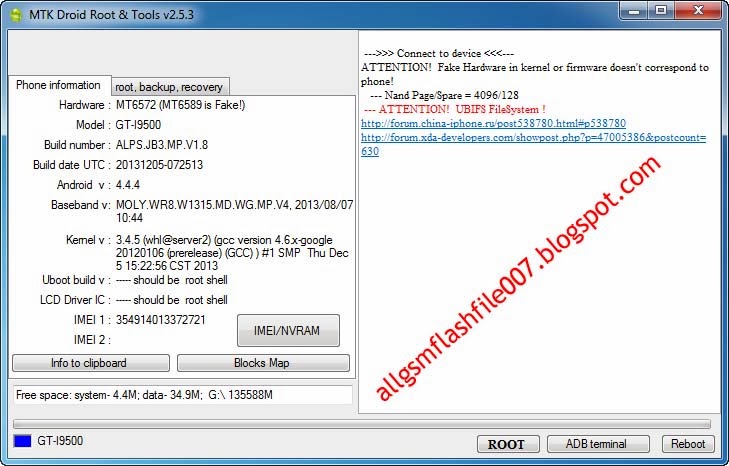
Here is the Mtk Droid tool info

Winmax W800 white lcd version pac firmware Latest Flash File Download

Winmax W800 white lcd version pac firmware Latest Flash File Download winmax w800 spd 6820 Flash File Download 100% Tested ok.winmax w800 Flash File.Directly For Free Without Password & Direct Download This is The Latest Version Firmware Available. It is Tested As Well As Good And Working .
 Info-s8_6820_2.1_winmax_e9660_user_chcx_256M_rv1.0_rc07_20131128.pac
Winmax W800 FLASH FILE WHITE LCD NEW VERSION FIRMWARE
Winmax W800 Factory File
WINMAX-W800 WHITE LCD NEW VERSION FIRMWARE
File Info-s8_6820_2.1_winmax_e9660_user_chcx_256M_rv1.0_rc07_20131128.pac
Rar Password-   bakar_siddeik@yahoo.com121

Maximus Max 16 mtk 6572 flash file download How To Update

MAXIMUS_MAX16 official-firmware 100%ok By_Bakar Telecom
MT6572
Maximus Max 16 mtk 6572 flash file download full free
maximus max16 latest version official stock room download
 [​IMG]
 
Rar Password-   MAX16 100% Ok By_Bakar Telecom​
 
...::::Flash Reed::::...
PLEASE READ AFTER FLASH YOUR PHONE
1. DO NOT FLASH OFFICIAL FIRMWARE IN ANY BOX (SOME USERS DEAD MANY SET WHEN SET SHOW IN LOGO).
2.PLEASE ONLY USER DATA ,RECOVERY FIRST FLASH (MANY SET ARE DIFFERENT VERSION SO, WHEN SET FULL FLASH SET IS WHITE SCREEN OR DEAD ).
3.IF SP NEW FLASH TOOL ARE SHOW ERROR PLEASE USE OLD VERSION I AM DONE IN MANY TIME.
How To Flash MTK Android (Sp flash tool ) tutorial

2015 new Blackberry Omep Unlock Tools Free Download

2015-01-10_151844ggg
GreenBerry Free v.0.2.7
Blackberry Omep Unlock Tools Free Download
Greenberry free v0.2.7 full free download

Sony Xperia C3_D2533 Firmware Latest Flash File Download

  
Sony Xperia C3_D2533 Firmware Latest Flash File Download Directly For Free Without Password & Direct Download This is The Latest Version Firmware Available Allsolutiongsm.com. It is Tested As Well As Good And Working .
Sony Xperia C3_D2533 Pattern Lock Done

Opsson U80 Spd 6531 4Mb Latest Flash File Download

Opsson U80 Spd 6531 4Mb Latest Flash File Download
Info
CPU TYPE:SC6531 [65310000]
FLASH ID: 00C8006000160000
Flash Type:[GD] 25LG32bWL
Size:0x400000(4MB)
Reading completed.
>>The data has been saved in C:\Users\pc\Desktop\_20150110_151409_FullFlash.bin, size: 4 M.